
Importing Metrc Sample information
Download a Metrc Transfer
With the Track and Trace addon installed in your browser, a few more options become available in the Metrc UI
Navigate to the Transfer you want to download and click its T&T icon
On the T&T menu, click [Download summary XLSX]
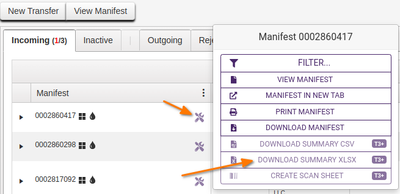
An XLSX will be downloaded to your configured downloads folder, import this file into Bika
Bika Batches from Metrc Transfers
On the Bika Batch lists, an additional Add button is available, [+ Add Metrc Batch] which leads to a file lookup where the user finds the file to be imported and clicks [Submit]

The LIMS creates a New Batch for the Client, using the Metrc Manifest ID, giving it an unique LIMS Batch ID
The user lands on Batch’s Sample registration page to continue creating Samples from the Import’s Packages
Bika Samples from Packages
The LIMS opens the Sample Registration form, 1 Sample column per Package, and populates all fields for which data could be found on Metrc
Fields that should have data - depending on how well the client completed the Metrc Transfer pages - include:
- Licence - read from the file header row
- Package ID - Bika Metrc Sample ID
- Item Category - Sample Type
- Item Strain - Strain
- Quantity (concatenate the Quantity and Unit of Measure values separated by a space, e.g. 5 and g becomes ‘5 g’.
- Weight
If the Strain is not found on the DB, the LIMS creates a new one with the name received from Metrc
The LIMS provides from new Client attributes
- Metrc CC Contacts
- Client Contact
- CC Contacts
Complete the form
The user reviews the Sample registration form, all samples on one page, and edit or add data that Metrc does not provide, most importantly which Analyses to carry out
Much of it is obtained directly from the lab Client, e.g.
- Client Contact
- CC Emails - for additional COA recipients not configured
- Analyses or Profiles (Panels) requested
- Specification to use
- Image
- Remarks
The user presses [Save] when everything is in order
If configured, the LIMS initiates the Samples' label printing with inhouse IDs. The Samples enter the standard workflow
Big Transfers
For big transfers, the system will repetitively present the user with the Sample registration form, configurable but say 5 samples at a time until all are imported
Metrc Batches
The user is returned to the Batch's Sample list where the new Samples are listed in the start state configured for the LIMS
Batches are listed with their Manifest IDs and a link to the downloaded Metrc file that was imported to it
These Batches' titles include the transfer manifest ID, e.g. Metrc Import 6781588 for Manifest ID 6781588