Generic Instrument Results Importer
Use Bika's '2D Importer' to import instruments results for which interfaces are not available yet. Tutorial
Set up a 2D Importer Instrument
See Instrument Configuration in the manual
Navigate to Instruments in the Setup

Add a new instrument

In this case we call it 2D Generic Importer

NB. You must select the 2-Dimensional-CSV import data interface for it

Save
2D CSV Layout
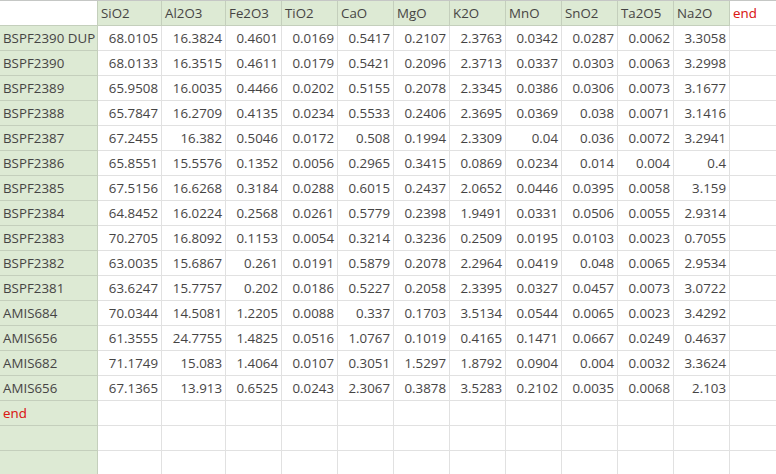
The desired spread sheet has
- Sample IDs in column A
- Analyses identified by Keyword in row 1
- Results at the intersections of each Sample and Analysis
- 'end' after the last row in column A, as well as after the last column in row 1

Conversion
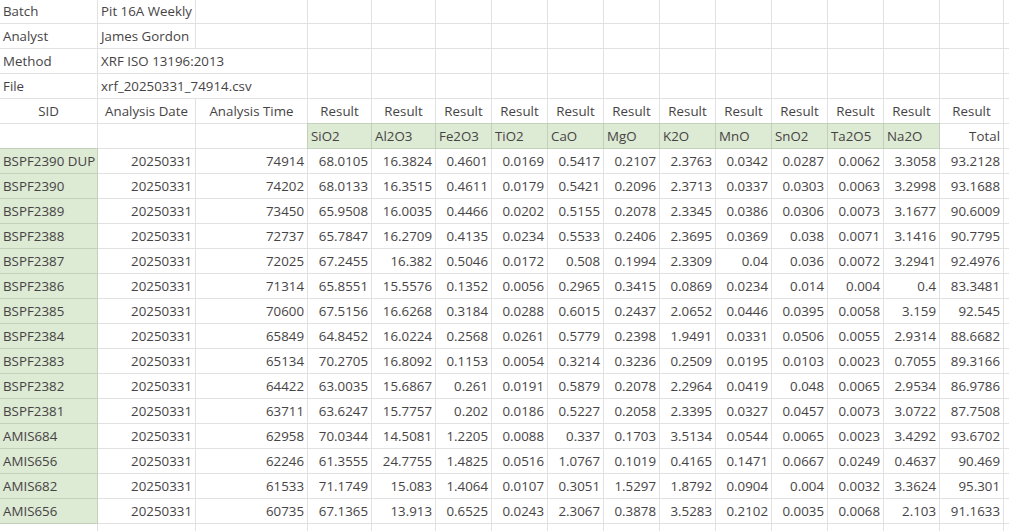
Create a second sheet in the standard Bika 2D layout, Bika 2D here, in the same spreadsheet book. This sheet will besaved as CSV and imported
Use lookups Bika 2D to read values into the correct position
In this example cell A7 on the Results Export sheet, the first Sample ID, is read into A2 in Bika 2D
It is assumed the instrument file layout will never change. If it does, revisit this conversion