
Changing the admin password
After installation, leaving it as admin/admin not advised
One of three options
1. In the UI
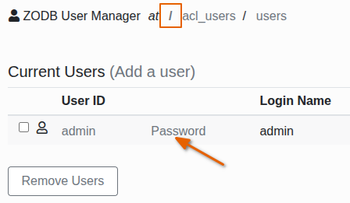
Go to Site Setup -> Manage Interface -> Root Folder(/) -> acl_users -> users
NB Be sure you are in the root folder / as there is also an acl_users in the page you land on in the Management Interface, /bikalims/acl_users
Click on Password and follow the instructions
2. Inside the container
Make sure the container is up
docker compose up -d instance1
docker compose exec instance1 bash
./bin/zope-passwd -u admin -p new_password
Then get inside
Run
3. Edit the docker-compose.yml file
Add the two new lines below
image: bikalims/bikalims:v4.0.0
ports:
- 8081:8080
links:
- zeo
deploy:
resources:
limits:
cpus: "1"
memory: 2048MB
environment:
ZEO_ADDRESS: "zeo:8080"
PLONE_SITE: "bikalims"
PLONE_TITLE: "BikaLims"
PLONE_SITE_OWNER: "admin" # 👈 new line
PLONE_SITE_PASSWORD: "secret123" # 👈 new line
PLONE_PROFILES: >-
senaite.lims:default
senaite.instruments:default
bika.ui:default
bika.coa:default
bika.extras:default
bika.reports:default
senaite.crms:default
senaite.storage:default
instance1: